Salesforce Process Mining: How to See How Work Actually Runs in Your Org

Salesforce Process Mining: How to See How Work Actually Runs in Your Org
Every RevOps team has a sales stage diagram somewhere. It's on a slide in the SKO deck or pinned in an enablement doc. Qualify, Discover, Propose, Negotiate, Close (or a similar flavor). Five neat boxes, one arrow each.
Now open the stage history on last quarter's deals. You'll likely find opportunities that jumped from Discover straight to Closed Won. Some went back to Qualify twice. A few sat in Propose for weeks, and nobody noticed until the forecast call.
When I was a product owner, I learned this early: the process doc and the process were never the same thing. The doc tells you how work is supposed to move. The data tells you how it actually moves. Process mining is how you read the data.
That gap isn't just a curiosity. When you can't see it, you can't fix much of anything:
- You can't trust the forecast. If deals skip stages or sit in them for weeks, stage-based forecasting is built on stages that don't mean what they say.
- You fix the wrong thing. Without the real path, the default answers are more training, more fields or more headcount. Often the actual fix is a routing rule or one step nobody needs.
- You can't prove a change worked. No baseline, no before-and-after. Just a new process and a hunch.
- You automate the mess. Point a flow or an agent at a process you haven't seen, and it runs the broken path faster.
That's where process mining comes in.
What is process mining?
Process mining is a way to see how a process actually runs by reading the event history a system already records: what changed, when and by whom. Instead of asking people how work moves, you rebuild each record's path from the data. Then you look across thousands of paths for the common routes, the detours and the stalls.
In Salesforce, that history lives in Field History Tracking. You can mine it three ways (build reports yourself, export it to an enterprise platform or use a native app), and we'll walk through all three below.
Metadata tells you what's configured. Field history tells you what happened.
Most Salesforce analysis starts with metadata: the objects, fields, flows, validation rules and page layouts that define your org. That's useful. It tells you how the process was designed.
But metadata can't tell you whether anyone follows the design. A stage can be required on paper and skipped in practice. A flow can fire on every record and still leave deals sitting for weeks.
Field history is the other half. Every time a tracked field changes, Salesforce records the old value, the new value, who changed it and when. String those changes together for one record and you get its path. String them together for thousands of records and you get the process as it really runs: the common paths, the detours and the stalls.
The data in the records tells you the rest. Which fields reps leave blank. Which picklist values nobody picks. Which "required" steps get filled with a placeholder just to move the deal along. A field that's empty on most opportunities isn't helping anyone forecast, and it's one less thing to put in front of a rep or an agent.
You need all of it. Metadata shows how the process was built. Field history shows how work moves through it. The data shows what people actually fill in along the way.
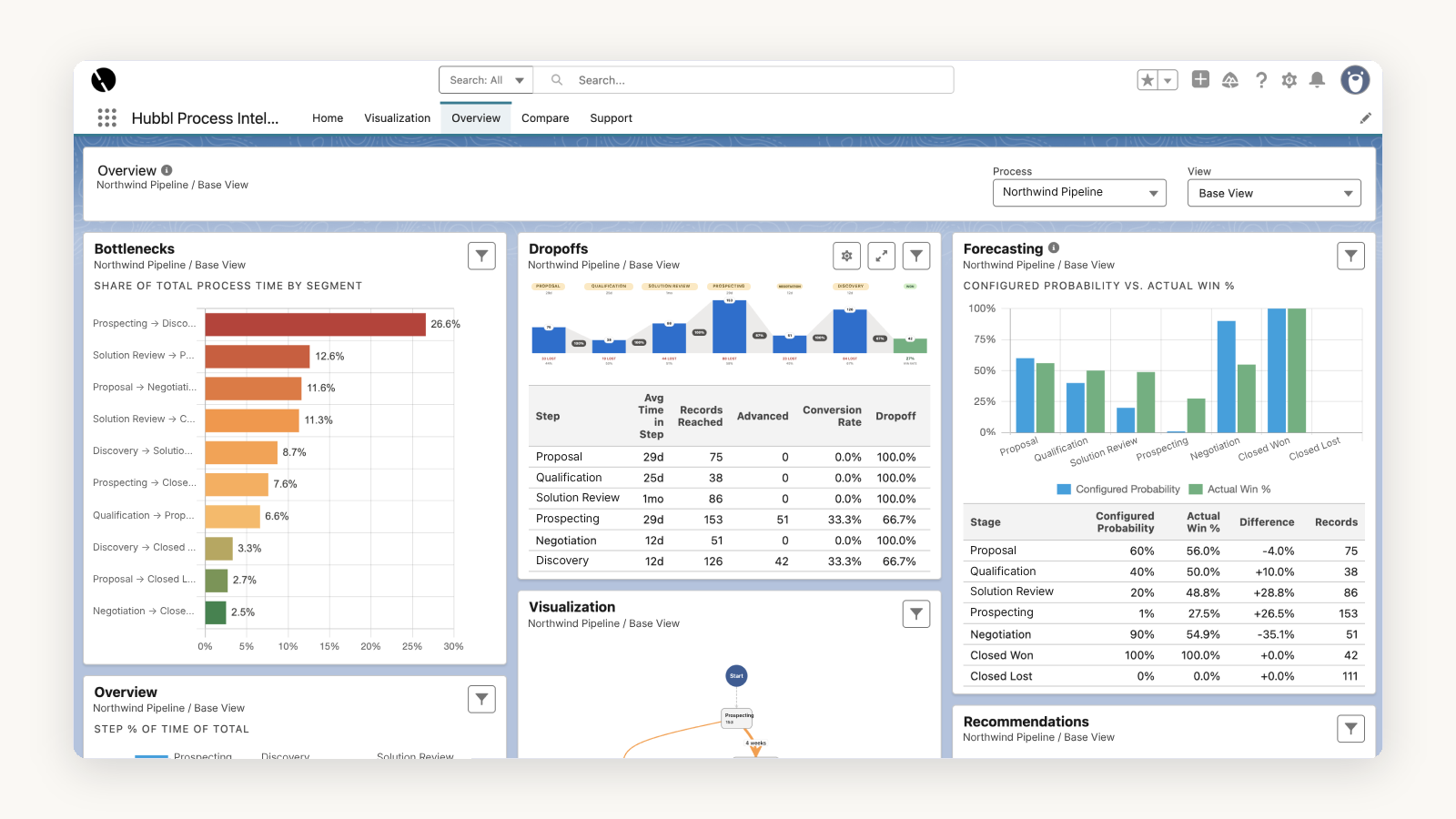
What process mining answers for RevOps
Dashboards tell you where the pipeline is. Process mining tells you how it got there. A few questions it answers well:
- Where do deals actually stall? Rank every stage and transition by how long records sit there. Then separate the steps that are slow by design, like legal review, from the ones where work is stuck.
- What do won deals do differently? Compare paths for won vs. lost, fast vs. slow, or top reps vs. the rest of the team. The differences often point to a step that matters more than anyone thought.
- Where does work ping-pong? Count how often a lead or opportunity changes owners before someone works it, and which handoffs add the most time. The fix is usually a routing or assignment rule, not more headcount.
- Did the fix work? Pick the date a change went live (a new flow, a required field, a new stage) and compare the process before and after. You get a number to bring to leadership instead of a hunch.
None of these questions are new. What's new is answering them from the data instead of a workshop where everyone remembers it differently and the loudest person in the room wins.
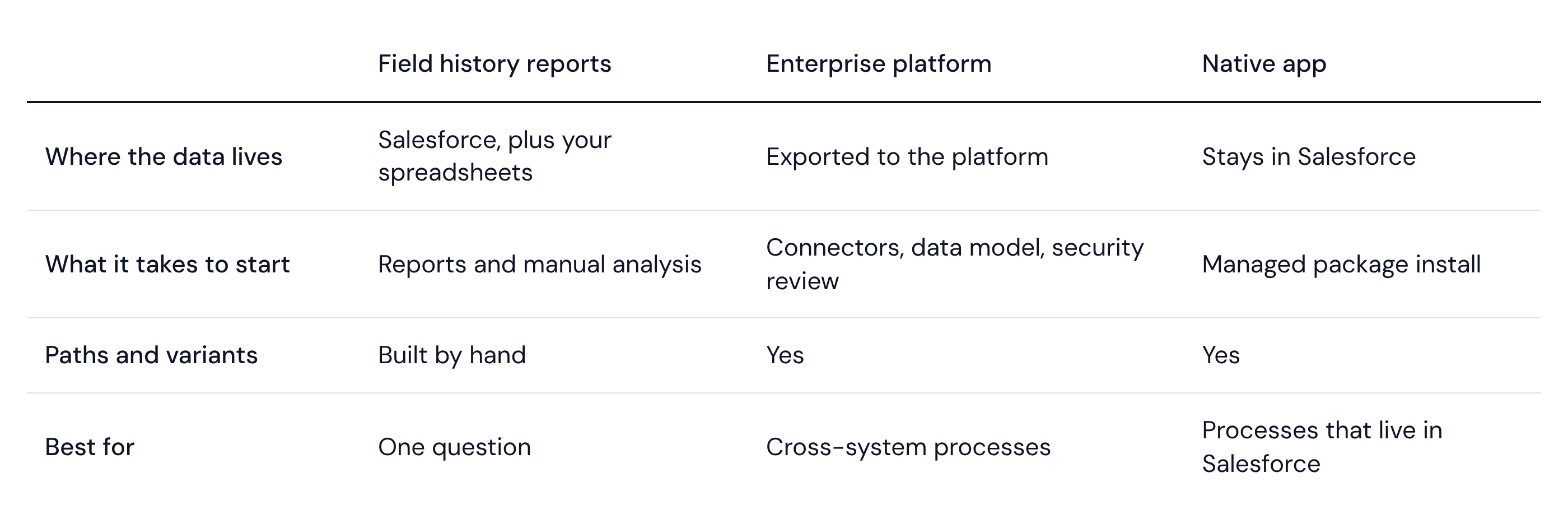
Three ways to do process mining on Salesforce
There's no single right answer here. The best approach depends on your question, where your process lives and what your security team will sign off on.
1. Build it yourself with field history reports
Salesforce gives you history reports out of the box, like Opportunity Field History. Filter to Stage changes, export them, and you can calculate time in stage with a spreadsheet and some patience.
Good for: one specific question, like average days in Propose last quarter.
Trade-off: reports show changes as rows, not paths. Seeing how thousands of records flow, where they loop and which variants win takes a lot of manual work. And it's a snapshot you'll rebuild next quarter.
2. Export to an enterprise process-mining platform
Celonis is the category leader in process mining. Apromore, which Salesforce acquired in 2025, is a strong research-grade platform. Both can pull Salesforce data through connectors and analyze it alongside your other systems.
Good for: processes that cross systems, like order-to-cash running through Salesforce and your ERP. If you need one view across finance, supply chain and CRM, this is the right tool.
Trade-off: your data leaves Salesforce, which usually means a security review and a data-modeling project before the first insight. These platforms are built to see events across systems, so the Salesforce configuration behind a stall (the flow, field or permission causing it) isn't their focus.
3. Run process mining natively inside Salesforce
A native app installs in your org and reads the field history Salesforce already records. That's the approach behind Hubbl Process Intelligence, the only 100% Salesforce-native process mining app on the AppExchange. It installs as a managed package, no data leaves Salesforce and there are no external callouts.
Good for: processes that live in Salesforce (lead to opportunity, opportunity stages, case handling, renewals), and teams who want answers without a data project.
Trade-off: it's a managed package, so someone has to approve an install in production. It also only sees Salesforce. If your process runs through an ERP too, pair it with a cross-system tool.
Before you start
Whichever way you go, three things decide whether the answers are any good:
- Pick one process and one question. Don't start with "show me everything." Start with something like "Where do mid-market deals stall?" For RevOps, opportunity stages are the natural first process.
- Turn on Field History Tracking. Process mining can only see fields that are tracked. Make sure history tracking is on for the field that moves the process (Stage for opportunities, Status for leads and cases) and for Owner. If tracking was off, the clock starts when you turn it on.
- Define what "stuck" means. Some steps are slow on purpose. A two-week legal review might be fine. Agree on which steps should move fast before you read the numbers, or you'll chase the wrong bottleneck.
What this looks like in Hubbl
Hubbl Process Intelligence monitors the processes you choose in Salesforce and shows how they actually run: every path, every detour, every stall.
What RevOps teams lean on most:
- Process maps on day one. If Field History Tracking is on, default process views for Opportunity and Case are ready when you open the app. No configuration, no data prep, not report creation.
- Goals with insights. Set a goal, and Process Intelligence surfaces the bottlenecks, the rework and the stages that affect outcomes.
- Any object with a status. Standard or custom, if it has a status-like field with history tracking, you can monitor it.
- Export. Send raw data or process maps to Lucid or BPMN when the business wants a diagram.
- Ask AI. The Process Intelligence MCP connects to Claude, so you can create views, analyze results and summarize the biggest findings in a conversation. Pair it with Hubbl's org intelligence, and one session goes from where a process stalls to the configuration behind it. Process mining tells you where. Org intelligence tells you why.
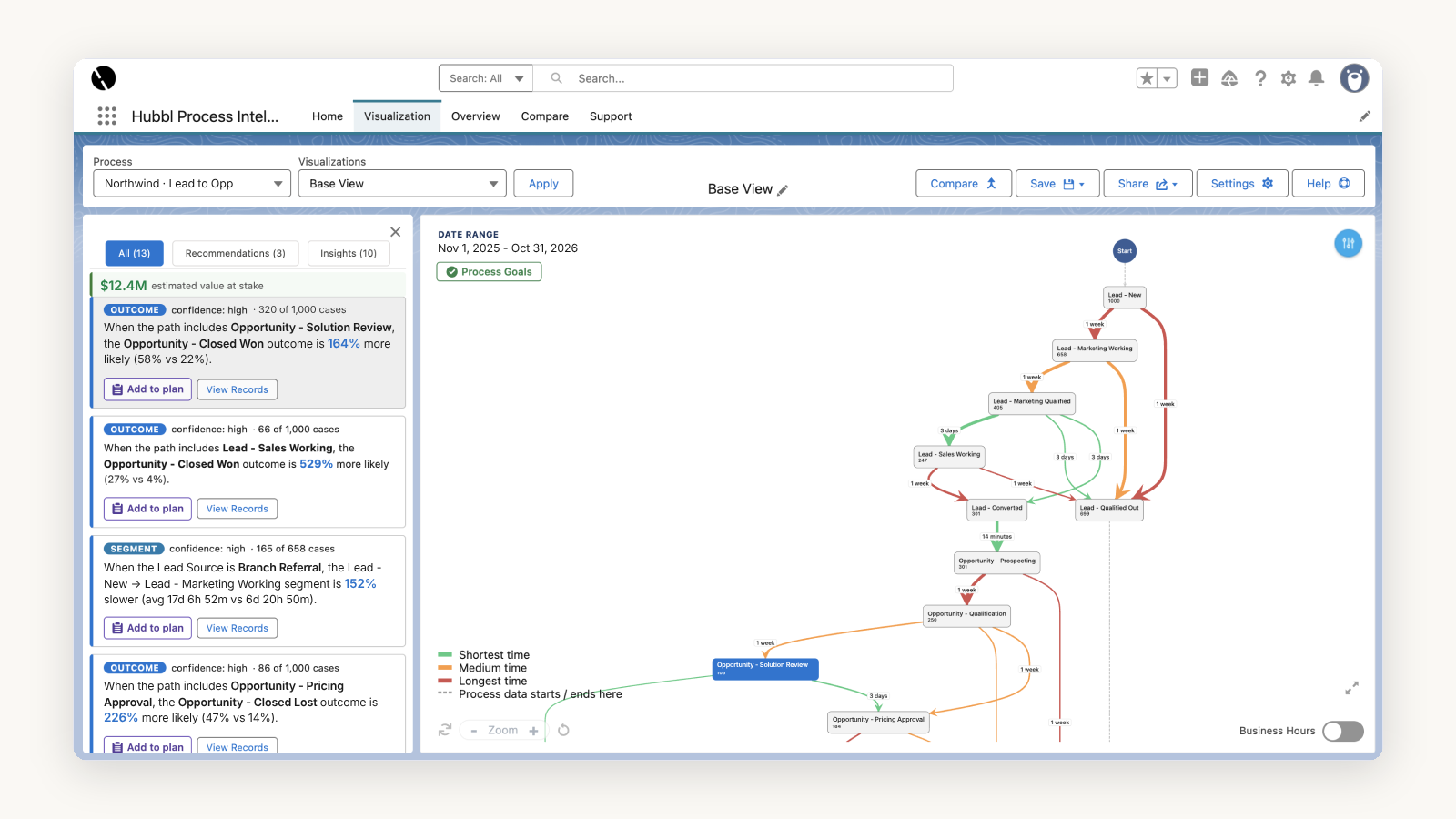
Salesforce runs Process Intelligence on its own org. It showed that 17% of one renewal type was going through the wrong process.
Where this goes next: deciding where agents belong
If you're planning Agentforce, process mining answers the question most teams skip: which processes are ready for an agent?
Look for high-volume paths with few variations and repeated manual steps. That's where automation pays back fastest. Messy, high-variation paths need cleanup first, or the agent will get stuck in the same places your reps do. Process Intelligence can also recommend which processes are a good fit for Agentforce.
And because process mining reads history, your baseline already exists. When the agent goes live, you compare before and after the same way you would for any other change.
The process you have vs. the process you think you have
Every org has both. The stage diagram on the slide isn't wrong. It's a plan. Your field history is the record of what happened next.
Start with one process and one question. A week of real data will teach you more than a quarter of workshops.
Book a Demo. See Process Intelligence on your own opportunity process.
FAQ
Do I need Field History Tracking turned on? Yes. Process mining reads field changes, so the fields that move your process (stage, status, owner) need history tracking on. Analysis covers the fields that are tracked.
Does my data leave Salesforce? With Hubbl Process Intelligence, no. It's a managed package that runs inside your org, with no external callouts.
Which objects can I analyze? Any standard or custom object with a status-like field that has history tracking turned on, including leads, opportunities, quotes, cases and work orders.
Can process mining show where to use Agentforce? Yes. Low-variation, high-volume paths are the strongest agent candidates, and Process Intelligence can recommend which processes are a good fit.
Keep reading
Related resources


Turn the lights on. Then, fix everything.
Scan your org in 2 minutes. See what's broken, in what order to fix it — and get the prompts to do the work.