Lights On Live: See what your org, and your AI, can do now


Lights On Live: See what your org, and your AI, can do now
Turn the lights on. See what's broken. Get the prompts to fix it.
The Lights On release brings six releases together so you can see your whole org: what's in it, how work really moves through it, and how your orgs compare side by side. In Hubbl, and in the AI tools your team already uses.
On Tuesday, November 3, the Hubbl product team will walk through all of it live, in a real org. You'll leave knowing what's broken, what to fix first, and how to connect Hubbl to Claude and your other AI tools in a few minutes.
Tuesday, November 3 · 10 AM PT · 1 PM ET. Can't make it live? Register and we'll send the recording.
Why it matters
Nobody fully knows their Salesforce org. Every org has years of history: the field nobody will delete, the Flow built three admins ago, the "temporary" workaround that's still running. Your team has worked around it for years.
Now AI makes it worse. At Dreamforce, Marc Benioff put metadata at the center of Salesforce's AI. Whatever is in your org now shows up in every answer your AI gives. A messy org is now an AI problem.
You've probably felt it already. You ask Claude or Agentforce Vibes a simple question about your org and get a confident answer that's partly wrong. Ask again and you get a different one. Run more than one org and it multiplies.
How the Lights On release helps
Connect Claude to your Salesforce org and it can read it. Hubbl tells it what it's reading: what's working, what's not, and what to do next. Hubbl gets you Org Ready by answering four questions:
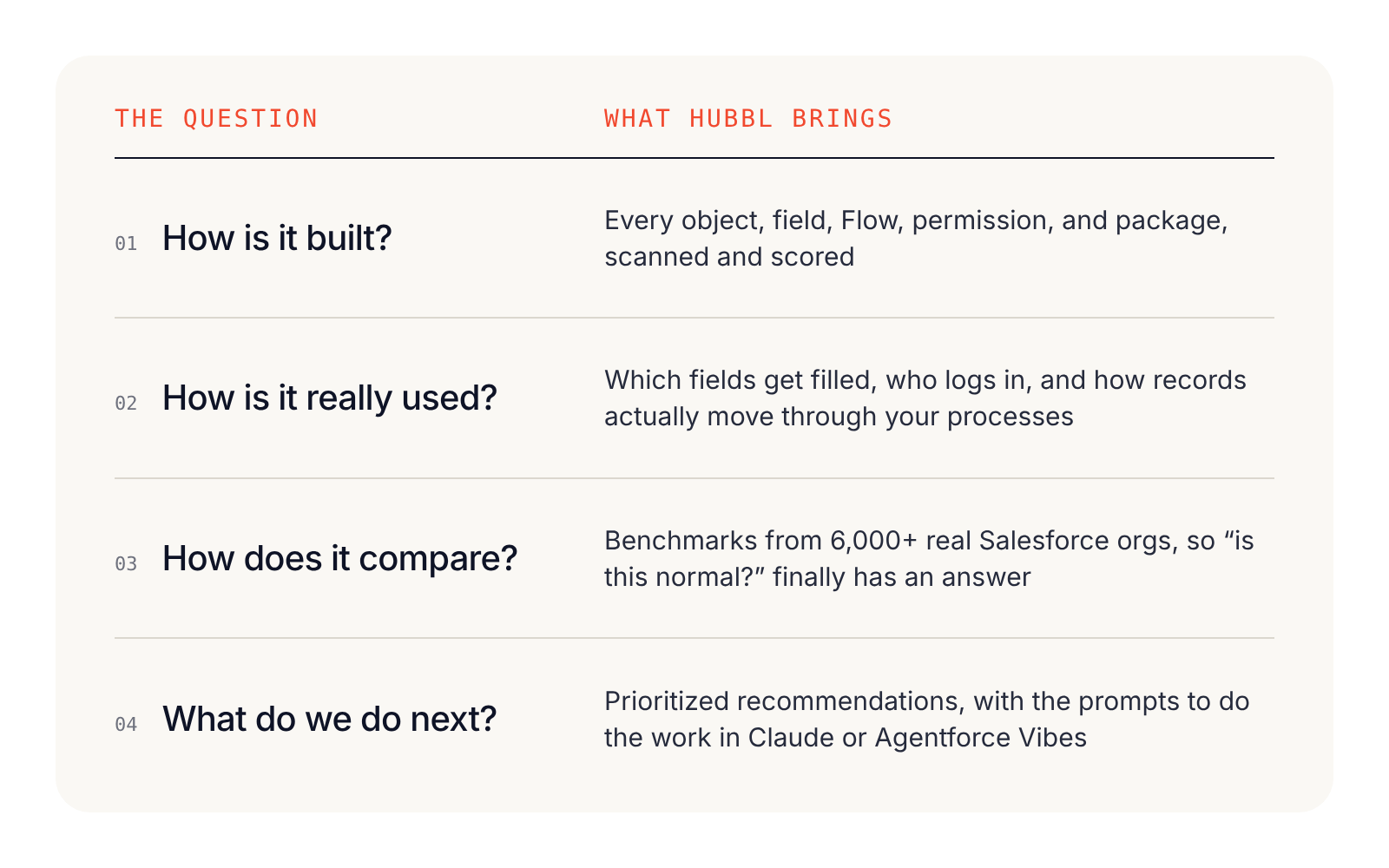
The Lights On release puts those answers into the AI tools your team already uses. Hubbl reads your org once, so your AI doesn't have to start over every time. Through the Hubbl MCP, Claude, Agentforce Vibes, and Cursor get a clear map of your org: what's there, what's risky, and what changed.
What that gets you:
- Answers you can trust. Same org, same scan, same answer, every time.
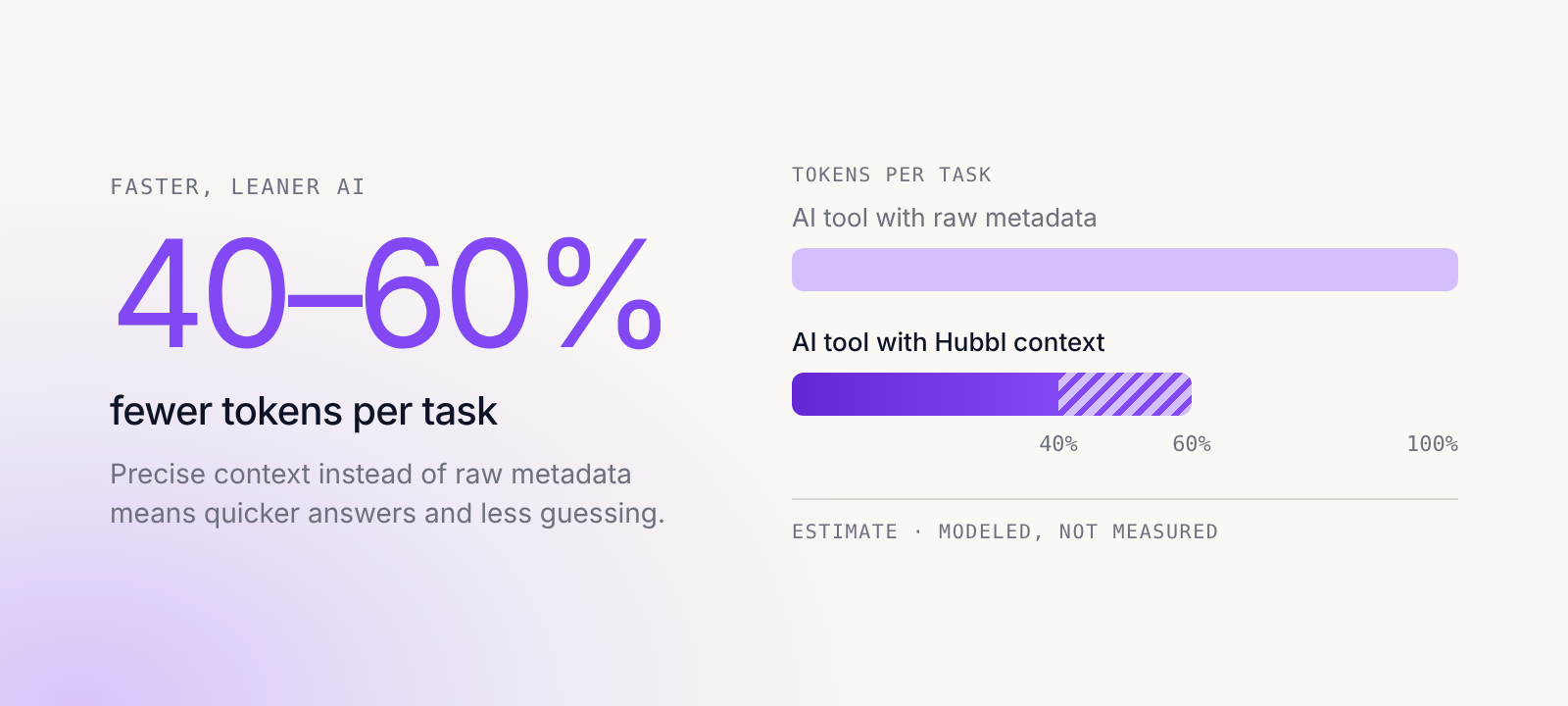
- Faster, leaner AI. Quicker answers, less guessing, and an estimated 40 to 60% fewer tokens per task (modeled, not measured).
- Agents in the right place. See where work actually stalls, so your first agent goes where it pays back.
- One picture for everyone. Admins, architects, leaders, and your SI partner see the same thing, across every org and sandbox.
What you can do now
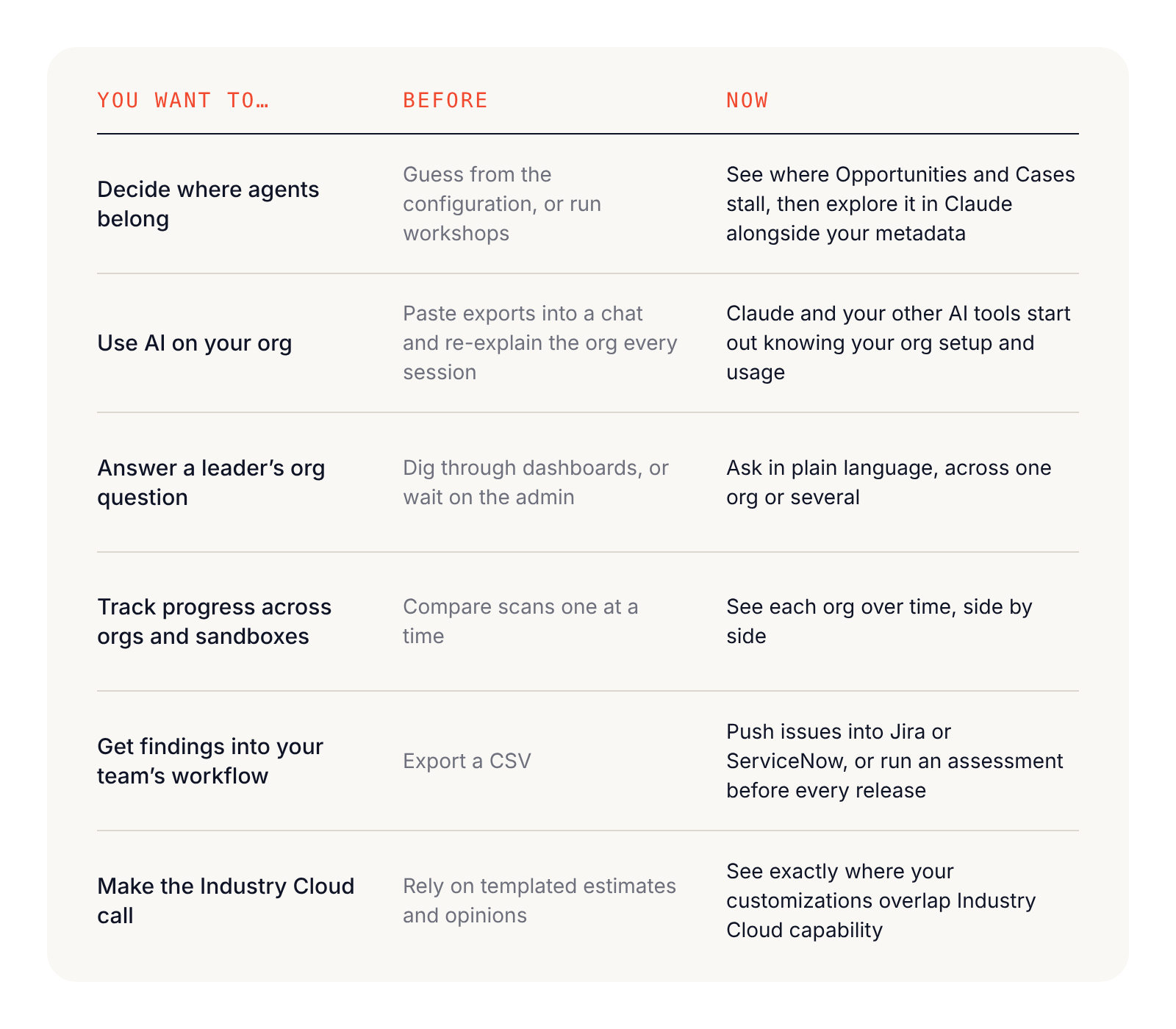
Here's what changes with the Lights On release.
Managing more than one org just got a lot easier
Most Hubbl customers run more than one org: production plus a stack of sandboxes, an org per business unit, or one that came with an acquisition. Until now, Hubbl looked at them one scan at a time. Now it works across all of them. My Orgs shows each org over time, side by side. Ask Hubbl and the Hubbl MCP answer questions across orgs, so Claude can compare them for you. The REST API pulls scan data across orgs into your own reporting and work management tools. And Hubbl Enterprise covers all your sandboxes.
What that makes possible:
- Mergers and acquisitions: compare two orgs before you bring them together, and see what overlaps and what conflicts.
- Multiple business units: see which org is healthiest, which is drifting, and where one team's fix would help another.
- Release management: catch the sandbox that has drifted from best practices before it impacts production.
- SI partners: manage every client org from one place and show each client its progress over time.
See how work really moves
Process Intelligence, now with MCP. A scan shows how your org is built. Process Intelligence shows how the business actually runs on it. Find where Cases, Opportunities, and other processes stall, which stages people skip or loop back to, and where an agent would pay back first. Now you can explore it in Claude alongside your metadata: list your processes, pull a view, or create and save a new one. Also new: goals with insights and recommendations, new visualizations, export to Lucid and BPMN, ready-made views for Case and Opportunity, and performance at scale for the largest orgs. Your agent roadmap starts from how work really moves, not how the org was designed to work.
- Who gets it: Hubbl Enterprise. Available now on AppExchange.
- Good to know: it installs as a managed package and runs inside your org, with no data leaving Salesforce. The ready-made views use Field History Tracking on Case and Opportunity.
"Hubbl showed us how cases and opportunities moved this quarter versus last, and exactly where they got stuck. We streamlined those bottlenecks, and analysis that took us two weeks took a couple of days." Nripendra Tamang, Head of Salesforce Practice, Altimetrik
My Orgs. Your orgs, not your scans. Hubbl data now has a new organization and layout, built around the orgs you manage instead of one scan at a time. See each org over time, side by side with your other orgs and sandboxes. Catch drift early, even in the sandbox nobody has refreshed in a year, and show leadership what's improved without building the report yourself.
- Who gets it: all customers. Arriving Oct 29, with no setup.
- Good to know: navigation changes, so some things will be in new places.
Ask your org anything, wherever you work
Hubbl MCP. Your org, already mapped for your AI. Everything in your Hubbl dashboard, now in your AI tools: org overview and Hubbl Score, issues and recommendations, metadata, security and access, adoption and usage, code quality, and packages. It comes with five built-in prompts and five skills, like Security Risk Audit and Legacy Automation Cleanup. Use it to run an Agentforce readiness check, build a clean-up plan, draft a project plan or exec summary from real findings, or compare orgs before a merger. Every AI session starts from your real org data.
- Who gets it: Hubbl Professional and Enterprise. Available now.
- Works with: Claude (web, desktop, and mobile), Claude Code, Agentforce Vibes, Cursor, Microsoft Copilot Studio, Codex, Cline, Slackbot, and any MCP-compatible tool.
- Good to know: it's read-only and never sees your record data. In Claude, add Hubbl from the connector directory and sign in. Changes still happen through your own Salesforce connection.
"With the Hubbl MCP, our agents work from real org data instead of guessing. Assessments that used to take 4 to 6 weeks of back and forth now start with a scan that runs in about an hour." Bryan Miller, Global Technical Success Director, Certinia
Ask Hubbl. Ask your org anything. Get a straight answer. Expanded based on how customers use it, Ask Hubbl now takes free-text questions across your Hubbl dashboards, for one org or several in the same conversation. Try "What are our biggest security risks?" or "What should we fix first?", then copy the findings and prompts into Claude or Agentforce Vibes. Leaders get answers without waiting on the admin. Admins get their afternoons back.
- Who gets it: Hubbl Professional and Enterprise. Available now, no setup.
"AI tools are partly right. There's a lot of hallucination because the data sits in silos. With Hubbl, we're looking at what actually exists in the org, so we don't see hallucinations. It helps us make decisions." Nripendra Tamang, Head of Salesforce Practice, Altimetrik
REST API. Hubbl org data in your own software development workflows. The same intelligence as the Hubbl MCP, built for code, with versioned public endpoints. Push issues into Jira or ServiceNow, run a health check in CI/CD before each release, flag packages on retired Salesforce API versions, schedule governance audits, or pull scan data across client orgs. Org health shows up where decisions already get made.
- Who gets it: Hubbl Enterprise. Available now.
Make the big calls with facts
Cloud Match. Make the Industry Cloud call with facts, not hunches. See where your custom objects, fields, and packages overlap standard Salesforce and Industry Cloud capability, with recommendations on what to migrate and where. Then decide whether a move makes sense for your org and, if it does, how to approach it. For many orgs, the right answer is to stay put, and that's a useful answer too. This first release covers Financial Services Cloud, Nonprofit Cloud, Health Cloud, and Life Sciences Cloud.
- Who gets it: eligible Hubbl Enterprise accounts, rolling out this month.
"Having something that basically says, 'Hey, we've identified that you have incentive compensation that you've built custom here. Did you know that SPIFF handles 80% of what you're doing and here's the automated matchup that happens with that?' would be completely manual for us to do." Kenneth Kerns, EverCommerce
Join us at Lights On Live
What you'll walk away with
- A clear place to start, including where agents belong in your org
- Hubbl connected to Claude and your other AI tools, with the steps to do it in minutes
- A live look at all six releases in a real org
- Answers to your questions from the Hubbl product team
Who won't want to miss it
- Admins who want less time in Setup and more time building
- Architects who need the full picture before the next big call
- Salesforce leaders who want to know what's in the org, what's broken, and what to fix first
- Teams putting AI to work on Salesforce who want faster answers and fewer wrong ones
FAQs
- What is the Lights On release? Six releases that show you, and your AI, the whole org: how it's built, how work really moves through it, and how it compares with 6,000+ others. It helps your team decide where agents belong and what to fix first.
- Does this cost extra? No. Each release is included in the plans listed above. If you're not sure what your plan includes, ask your Hubbl account team.
- Do I need to set anything up? Ask Hubbl and My Orgs need no setup. The Hubbl MCP takes a one-time connection in your AI tool. Process Intelligence installs from AppExchange.
- Can Hubbl change my org? No. The Hubbl MCP and Ask Hubbl are read-only. Changes go through your own Salesforce connection.
- Is my data used to train AI models? No. Details are at trust.hubbl.com.
- I can't make it live. Should I still register? Yes. Register and we'll send you the recording.
- What happens after? Customer office hours follow on [Tuesday, November 10], so you can bring what you find and work through it with the Hubbl team.
Save your seat
Bring your questions, your team, and the Flow nobody wants to open.
Keep reading
Related resources

Turn the lights on. Then, fix everything.
Scan your org in 2 minutes. See what's broken, in what order to fix it — and get the prompts to do the work.